Draw a box on the Viewer. Get a clean AI matte, track it across the shot, refine the edges, and bake the sequence to disk — all inside Nuke, all on your GPU.
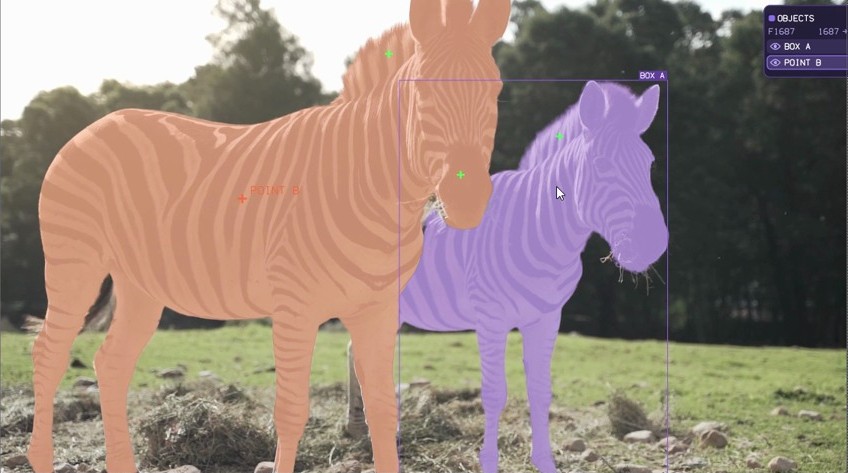
A full segment-track-refine-bake pipeline embedded in a single OFX plugin — no external apps, no round-tripping.
Add up to 16 objects with boxes or clicks, plus Include/Exclude refine points — drawn and edited directly on the Viewer.
Type “car”, “person”, “hair” and let GroundingDINO find and segment it. Score and IoU thresholds for fine control.
SAM 2.1 memory-bank tracking with occlusion handling. Anchor the init frame, press play, and watch the matte follow.
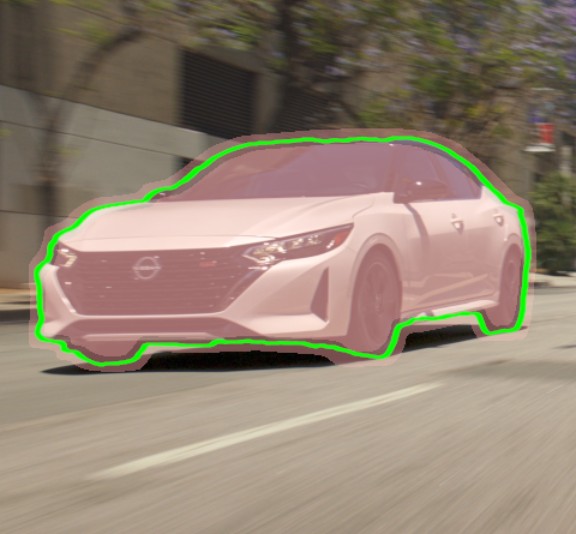
ViTMatte trimap refinement for soft, detailed edges — with erode, dilate, pre-blur and opacity controls.
Plate, Alpha, Overlay, Premultiplied, Stencil and Trimap — inspect the result however you work.
Bake the tracked mask sequence to 8-bit PNG or 16/32-bit EXR with a custom filename prefix.
Drop a bounding box around your subject on the Viewer.
Get an instant high-quality matte from SAM 2.1.
Press play — the matte propagates across the frame range.
Refine the edges and write the mask sequence to disk.
Hoides Matte has a dedicated Roto input. Pipe an existing roto shape in and its alpha is turned into a trimap and refined by ViTMatte — hair, motion blur and soft edges resolved automatically. No AI segmentation involved, so you keep the exact shape you rotoed.
Node-locked to one machine per seat, transferable anytime. All v1.x updates included. Prices in USD.
Larger facility? Contact us for volume & site licences.
By purchasing you agree to the
licence agreement.
No. Every AI model runs locally on your GPU. No image data ever leaves your machine. The only network call is a one-time licence activation.
Each seat is node-locked to one machine. Activate once and it works fully offline afterwards — ideal for firewalled facility workstations. Moving to a new machine? Deactivate the old one and activate the new, anytime.
That’s expected for a new independent publisher — Windows SmartScreen flags any installer it hasn’t seen at volume yet. Click More info → Run anyway. The installer’s SHA-256 is published on the download page so you can verify it.
The 7-day trial is fully featured. When it ends the node stops producing mattes until you enter a licence key — your comp and object setup stay intact, and activating restores everything instantly.
Yes — the 7-day trial is fully featured, with no account and no card required. Test it on your own shots first. If you hit a problem, email support and we’ll help.
Download the 7-day trial and see the matte quality for yourself. No account, no card.
Download free trial
 Downloader
 Uninstaller
 Streamer
 TV
 Filter