Matte Downloader Uninstaller Streamer TV Filter
Hoides Streamer · Windows, Android & Android TV · v0.1

One app for everything you watch.

The films and shows on your own drives in one library, where to stream everything else, and search that understands sentences. All on your PC.

Windows 10 & 11 · 64-bitAndroid 8.0+ phones and TVsNo account
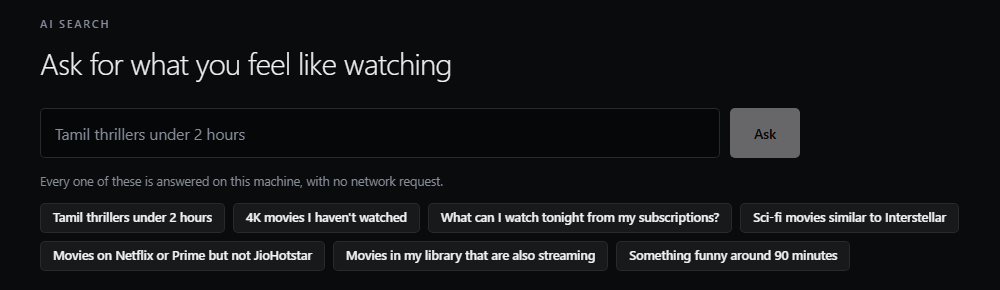
Hoides Streamer search: ask for what you feel like watching, answered on this machine
Search in plain sentences, answered on your PC with no network request
🔒 Your media files never leave your PC 💬 Search runs offline 🔗 Opens official services only 📱 Phone and Android TV apps
Features

Your library, organised for you

Point it at your folders. It works out what everything is and builds a library you can browse while it scans.

🗂

Your own library

Incremental scans, real technical details read with FFmpeg (resolution, HDR, Dolby Vision, audio and subtitle tracks), and television organised as show, season and episode.

💬

Search in sentences

“Tamil thrillers under 2 hours”, “4K movies I haven’t watched”, “on Netflix or Prime but not JioHotstar”: answered on your machine, with no network request.

🧭

Where to stream the rest

Tick the services you pay for. Titles on them are surfaced first, and choosing one opens that service’s own website. It is a signpost, not a player.

▶

Plays what you have

Matroska, HEVC and AC3 play in the app. Files it genuinely can’t play are handed to your system player instead of playing silently.

🖼

Every title gets artwork

Posters, cast and descriptions with a free TMDB key; without one, a frame is pulled from the file itself so nothing is blank.

🧠

Remembers everything

Resume points, watch history, profiles with PINs. Renamed or moved files keep their history, and an unplugged drive never wipes anything.

H

Your film, from your PC

2024 · 2h 05m · ★ 8.1 4K HDR

Continue where you stopped on the PC. The library, artwork and watch history come from Hoides Streamer over your Wi-Fi.

Continue watching
Episode 4
Holiday 2025
Concert film
Season 2
Illustration of the Hoides Streamer TV app’s home screen
Phone and TV

Your PC’s library, on the sofa.

The Android app runs on phones and on Android TV. It plays the files on your PC over your own Wi-Fi; nothing goes through the internet.

  • On the PC: Settings › Devices › turn on Network sharing
  • On the phone or TV, the app finds the PC by itself, or you type its address
  • Pair once with a six-digit code shown on the PC
  • Resume points sync both ways, so you can switch screens mid-film

The APK is also included in the Windows installer, so you can copy it to a device from the PC.

Privacy

Local by default, and specific about it

Your media files never leave the machine under any setting. Four things can reach the network, each with its own switch.

SendsDefault
MetadataA title and year, to TMDBOn
AvailabilityA title ID, to TMDB (JustWatch data)On
AI searchOnly the phrase you type, and only if you configure a modelOff
Cloud syncNothing: not implementedOff

Library contents, file paths, watch history and profile names are never transmitted. Streaming availability data is provided by JustWatch via TMDB. Hoides Streamer never signs in to, captures, proxies or decrypts any streaming service.
Requirements

What you need

PC: Windows 10 / 11 (x64) Runtime: Edge WebView2 (in Windows 11) Phone / TV: Android 8.0+ Optional: free TMDB API key

The installer offers a Full setup with the FFmpeg media tools, or App only.

Good to know

Limits

  • It does not play Netflix, Prime Video or any other service; it opens their own site.
  • Files whose only audio is TrueHD or DTS are sent to your system player.
  • Phone and TV playback needs the PC on and Network sharing turned on.
FAQ

Questions

Do I need a TMDB key?

No. Without one it still scans, identifies titles from filenames, browses and plays, with frames from the files as artwork. A free key adds posters, cast, descriptions and streaming availability.

Where is my library stored?

In %APPDATA%\com.hoides.streamer, separate from the program. Uninstalling asks before removing it and never touches your video files.

I used it when it was called Neuro streamer.

Install the new version. On first start your library, watch history, profiles and settings move to the new folder by themselves. On phones and TVs, install the new app and pair it once.

Bring your library together.

One installer for the PC, with the Android app inside.

Download for Windows