
Each file is split across up to 32 connections that stay busy until the very end, and every download picks up where it stopped, even after a restart.
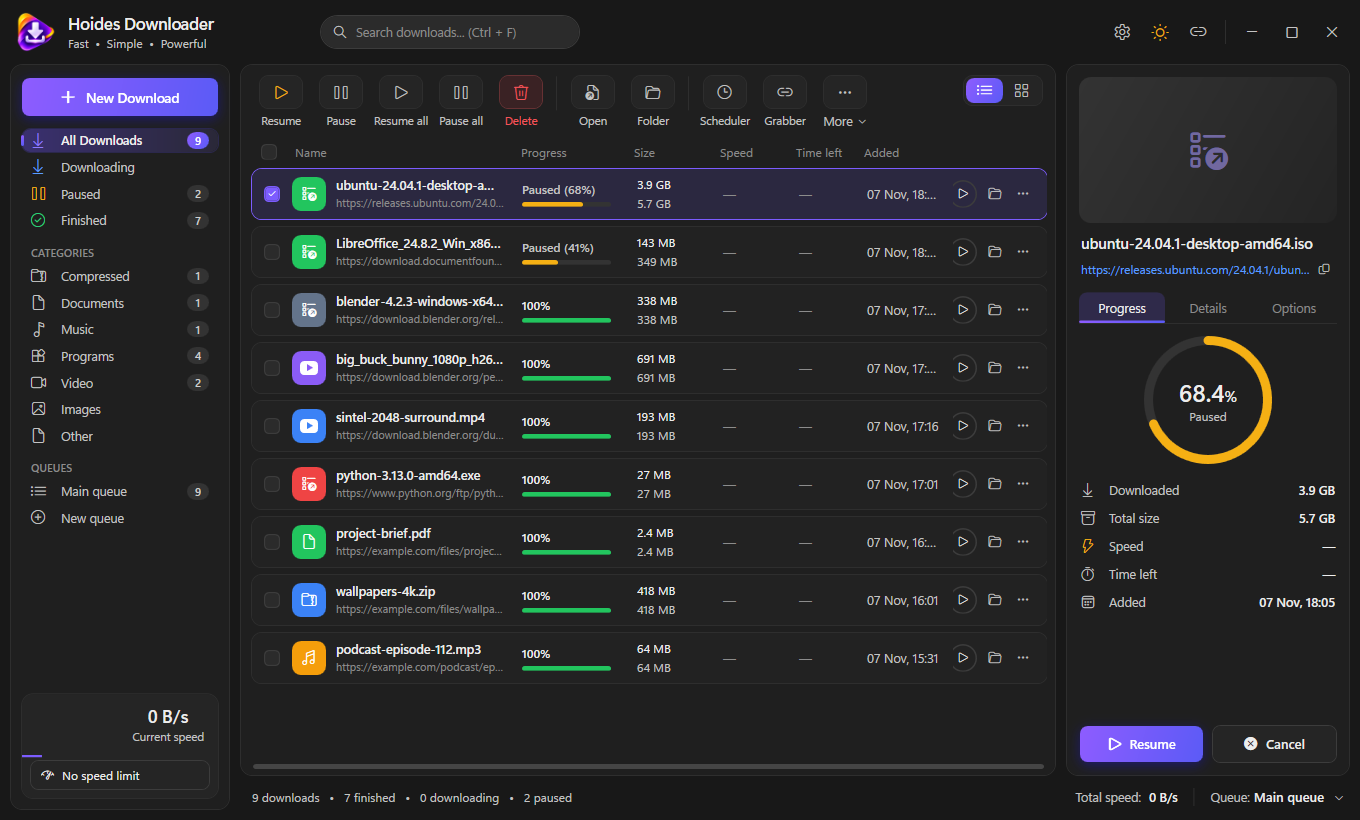
From a single large file to a whole playlist, a torrent or a scheduled overnight queue.
Files are fetched as parallel byte ranges. When a connection finishes early it takes over half of the slowest remaining range, so none sits idle.
Progress is saved per segment and survives app restarts. Dropped connections retry with backoff; servers without range support fall back to one connection.
The extension spots video and audio on a page and offers a download button. HLS streams download natively, with quality choice, AES-128 and live recording.
A quality list for YouTube and other sites supported by yt-dlp. Video and sound download in parallel and are joined into an MP4 that plays everywhere.
Magnet links and .torrent files, with trackers, DHT, peer exchange and router port opening. A finished torrent stops; it does not keep seeding.
Any number of queues, each with its own limits, start and stop times, days, and an action when done: exit, sleep, hibernate or shut down.
Give a download a new address, by clicking it again in the browser or pasting it, and it continues from where it stopped.
Numbered or lettered ranges like img*.jpg, pasted lists, crawling a site for files, or every link on a page at once.
Saved site logins are encrypted for your Windows account, downloads can be virus-scanned with Microsoft Defender, and you choose what happens when a file exists.
The Hoides Downloader extension hands downloads from Chrome, Edge, Brave, Vivaldi, Chromium and Firefox to the app, together with the cookies and referrer, so downloads that need a login still work.
Run the installer. It installs for your account without an administrator prompt, or for everyone if you choose.
Load the extension folder the installer adds to the Start Menu into your browser, once.
Downloads, videos and magnet links now go to Hoides Downloader, with a progress window and a segment map.
blob: links stay in the browser.Yes. Hoides Downloader is a Windows app; the browser extension only hands it the downloads. The extension ships inside the install folder.
In %AppData%\Hoides Downloader. Unfinished files sit next to their destination as name.hdpart until they complete.
Install the new version over it. On first start your settings, download list, saved logins and paused downloads move across automatically. Reload the browser extension once afterwards.
SmartScreen flags new installers it hasn’t seen often. Choose More info → Run anyway.
One installer, everything included: the app, the browser extension, yt-dlp and FFmpeg.
Download for Windows
 Matte
 Uninstaller
 Streamer
 TV
 Filter